
Printers and copiers supplied, watched and serviced on one agreement — toner turns up before anyone has to ask, and our own certified engineers do the servicing. You get one predictable cost per page instead of a drawer full of cartridges and a stack of separate invoices.
What you get
- Toner and drums arriving before anyone notices they were low
- One cost per page instead of ad-hoc cartridge buying
- Faults we've often spotted before anyone reports them
- Certified engineers on site for servicing and repairs
- One agreement covering the machines, the toner and the servicing
- Printing on the same account and bill as the rest of your IT
What we look after
Printing is the one thing in most offices that nobody owns until it stops. Here is what we take off your hands.
Devices
- Brother desktop and workgroup printers
- Brother multifunction devices
- Konica Minolta bizhub multifunction devices
- A3 copiers and high-volume machines
- Desktop scanners and label printers
The agreement
- Toner, ink and drums supplied automatically
- Cost per page, or a fixed monthly volume
- Buy the equipment outright, or lease it
- One invoice for the machines, the toner and the service
Service & repairs
- Our own certified engineers
- Servicing and preventative maintenance
- Repairs when something breaks
- Firmware and driver updates
- Installation and setup
Control & reporting
- Who printed what, by person or department
- Rules on colour, double-sided and volume
- Secure release at the machine
- Usage reporting across every machine
The brands we're authorised for
Brother makes the desktop and workgroup machines; Konica Minolta makes the A3 multifunction devices. Brother is the authorised distributor for Konica Minolta A3 in New Zealand, so one relationship covers both ranges.


Two ways to get the equipment
The machines and the service are the same either way — all that changes is whether you own them.
Buy the equipment
You own the machines outright, and the servicing and toner run alongside them as an ongoing agreement.
- Usually cheapest over the life of a machine
- Right when the capital is available
- Service and toner still covered by the agreement
Lease the equipment
Monthly instead of capital. Useful when several machines need replacing at once and paying for all of them up front is what's standing in the way.
- Spreads the cost rather than taking it up front
- Suits replacing several machines at once
- Ask us to price both ways before you decide
How it works
Nobody has to remember to order
The machines tell us how much is left, so toner, ink and drums arrive before someone's standing at a printer at 4pm on a deadline. No one's watching stock levels, and no one's keeping a cupboard full of the wrong cartridges just in case.
Our own certified engineers
Servicing, breakdowns and firmware updates are done by our own certified engineers — the same people who look after the rest of your IT, on the same agreement. You're not handed a vendor's 0800 number and left to explain the problem twice.
One cost per page
Printing stays invisible in a budget until someone adds up a year of cartridges. A cost-per-page or fixed monthly agreement turns it into a number you can plan around — and makes it obvious which machine is the expensive one.
We watch the machines
The machines report faults and toner levels back to us, so a failing printer is often something we've already seen. It's the same idea as the monitoring on your computers — most of what gets fixed, nobody had reported.
Rules on who prints what
Colour limited to the people who need it, double-sided by default, and documents held until the person is standing at the machine. Print management software such as PaperCut is available through the programme where you need that level of control.
From a desk printer to a big copier
Brother for desktop and workgroup machines, Konica Minolta bizhub for A3 and the heavier work. You don't have to work out which you need or who supplies it — it's one agreement, one bill, and one number to call whichever machine is playing up.
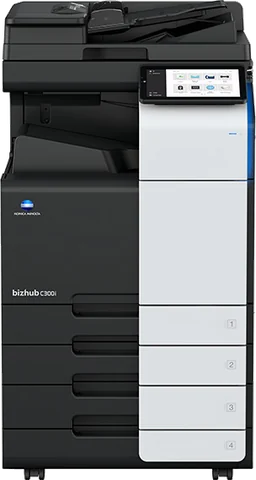
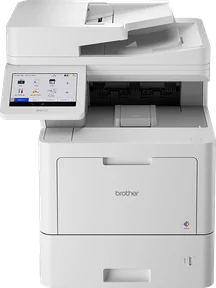
Two of the machines the programme covers — an A3 bizhub and an A4 Brother, shown at roughly their real sizes. Which machines suit your office comes out of what you actually print; there is no fixed pair in a package.
Common questions
Do we have to replace our existing printers?
What does managed print actually cost?
What happens when a machine breaks down?
How does the toner actually arrive?
Should we buy the machines or lease them?
Can printing go on the same bill as everything else?
Is this only for big offices?
Often taken together
Could you say what printing costs you?
Most people can't. Tell us what you run and we'll work it out with you before anything changes.